Two end-to-end Power Platform projects
Arcova Engage
AI-Integrated Power Platform Solution Architecture
Four Integrated Surfaces | Embedded Copilot Agent | Single Sign-On | One Shared Dataverse Model
The Business Problem
Arcova Advisory, a mid-size consulting firm, managed its client engagements through a fragmented mix of email and spreadsheets. Requests came in by email, status lived in people's inboxes, deliverables were tracked in scattered files, and clients had no way to see where their engagements stood without asking.
Key Pain Points:
✓ No single system of record for client engagements
✓ Manual triage and assignment of incoming requests
✓ No automated SLA tracking, so deadlines slipped unnoticed
✓ Clients with no self-service visibility into their own requests
✓ Status updates requiring manual email back-and-forth
✓ No structured escalation path for urgent issues
✓ Knowledge about process and pricing locked in people's heads
The Solution
An integrated Power Platform solution that unifies four distinct surfaces on a single Dataverse data model, so staff, clients, and an AI agent all work from the same source of truth.
Architecture Components:
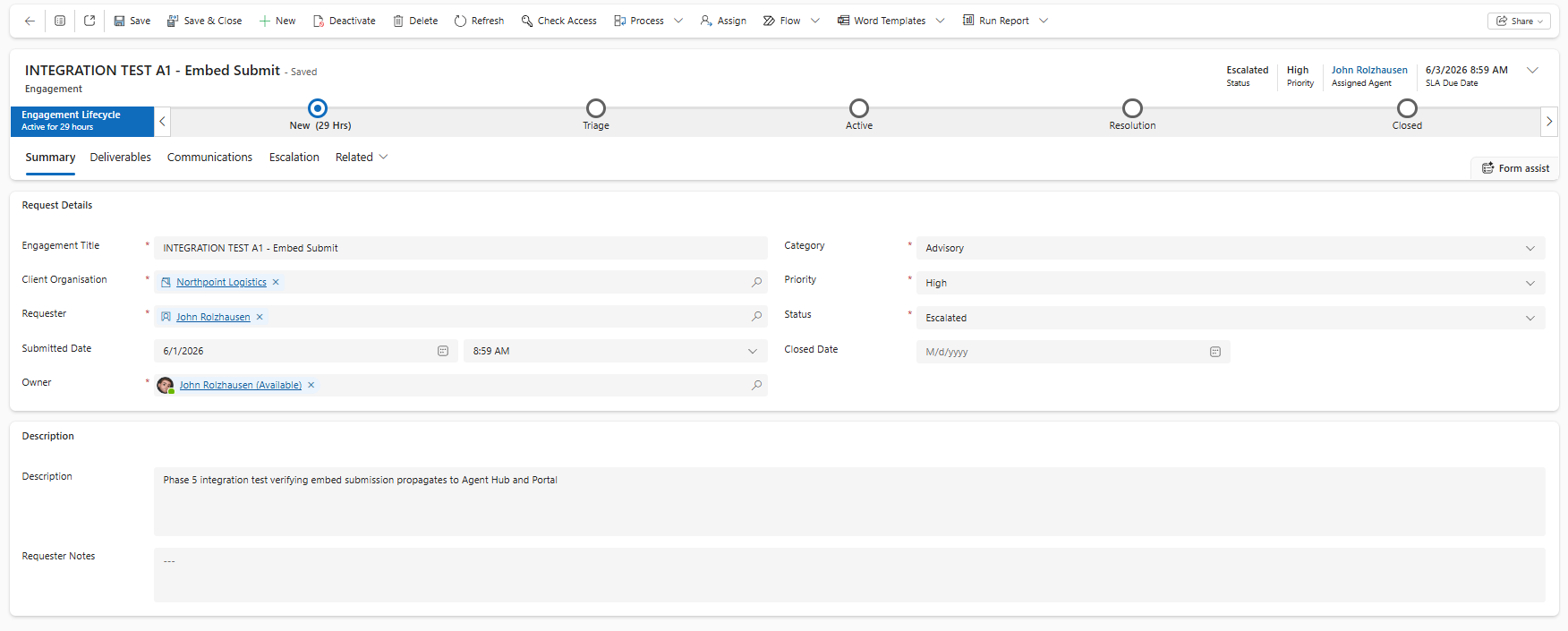
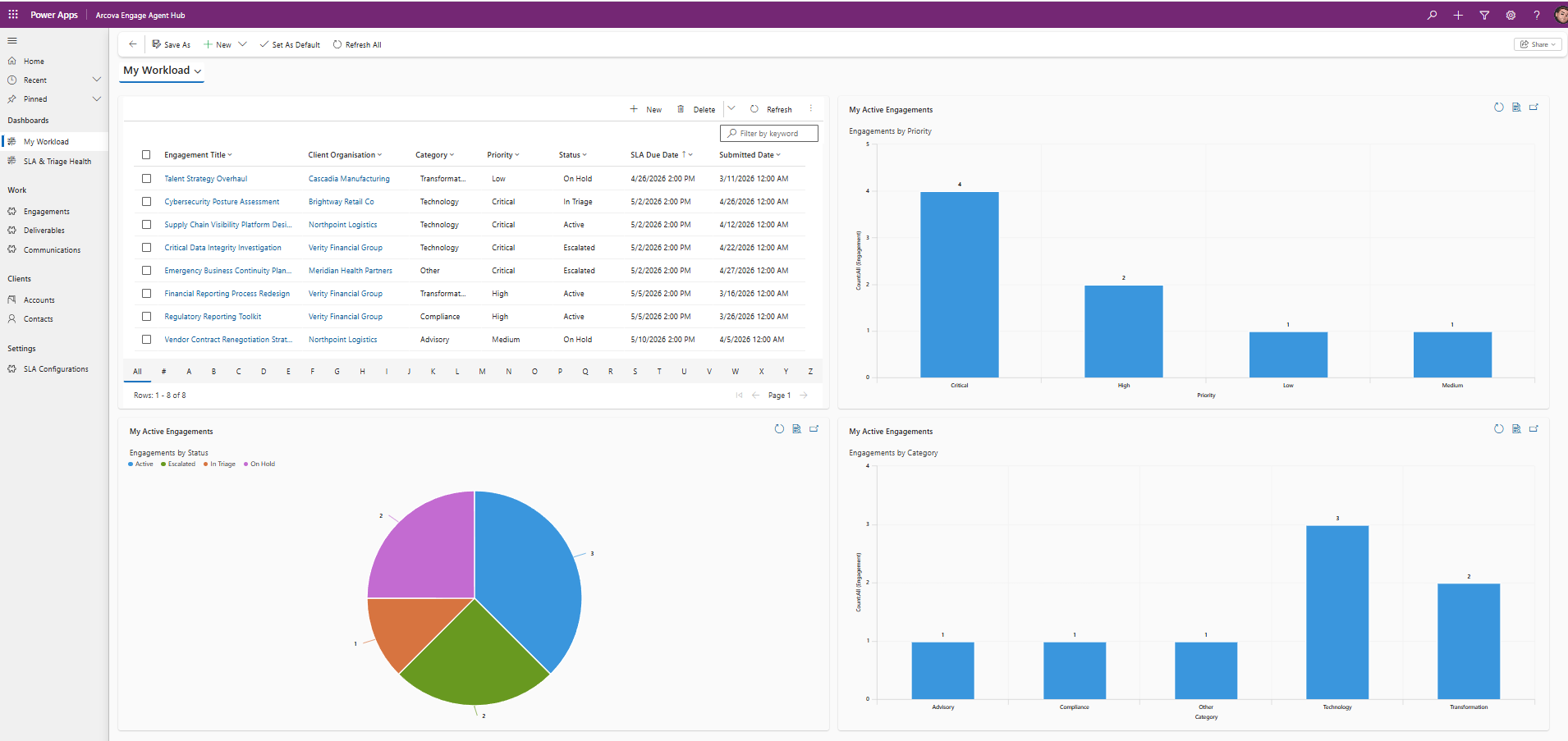
✓ Agent Hub (Model-Driven App): The staff workspace for triage, assignment, lifecycle management, and SLA monitoring, with custom security roles, a guided business process flow, and dashboards
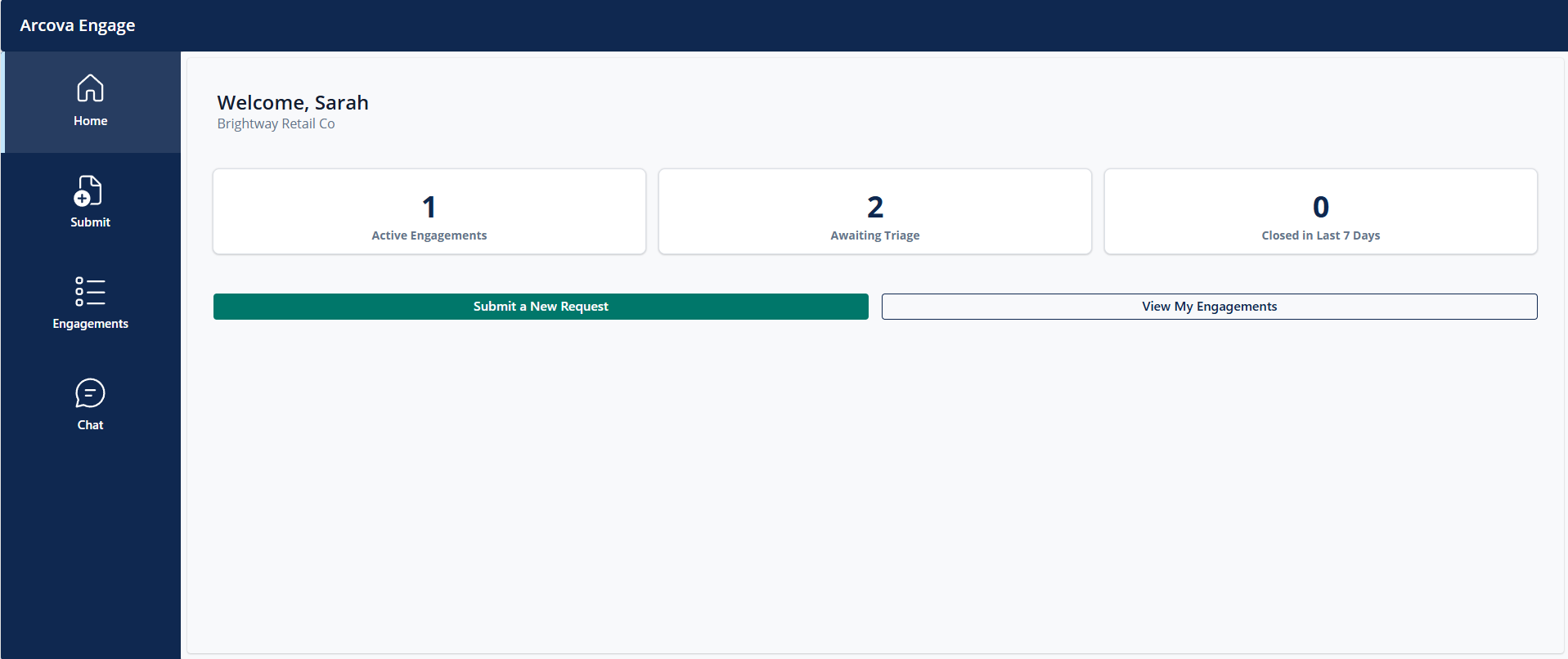
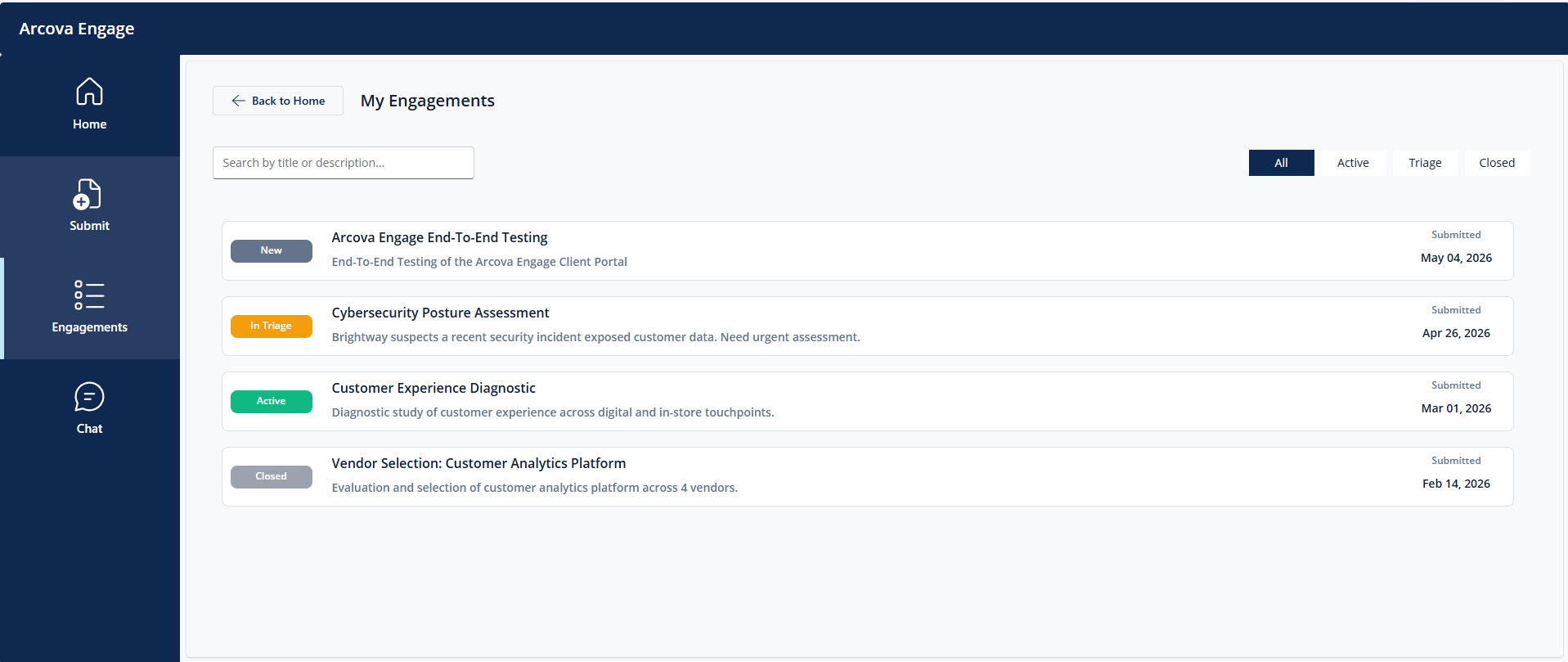
✓ Client Portal (Canvas App): A self-service surface where clients submit requests, track status, and review deliverables, scoped so they see only their own organization's records
✓ Power Automate Backbone: Seven flows handling intake routing, SLA calculation, status notifications, closure approvals, and escalation
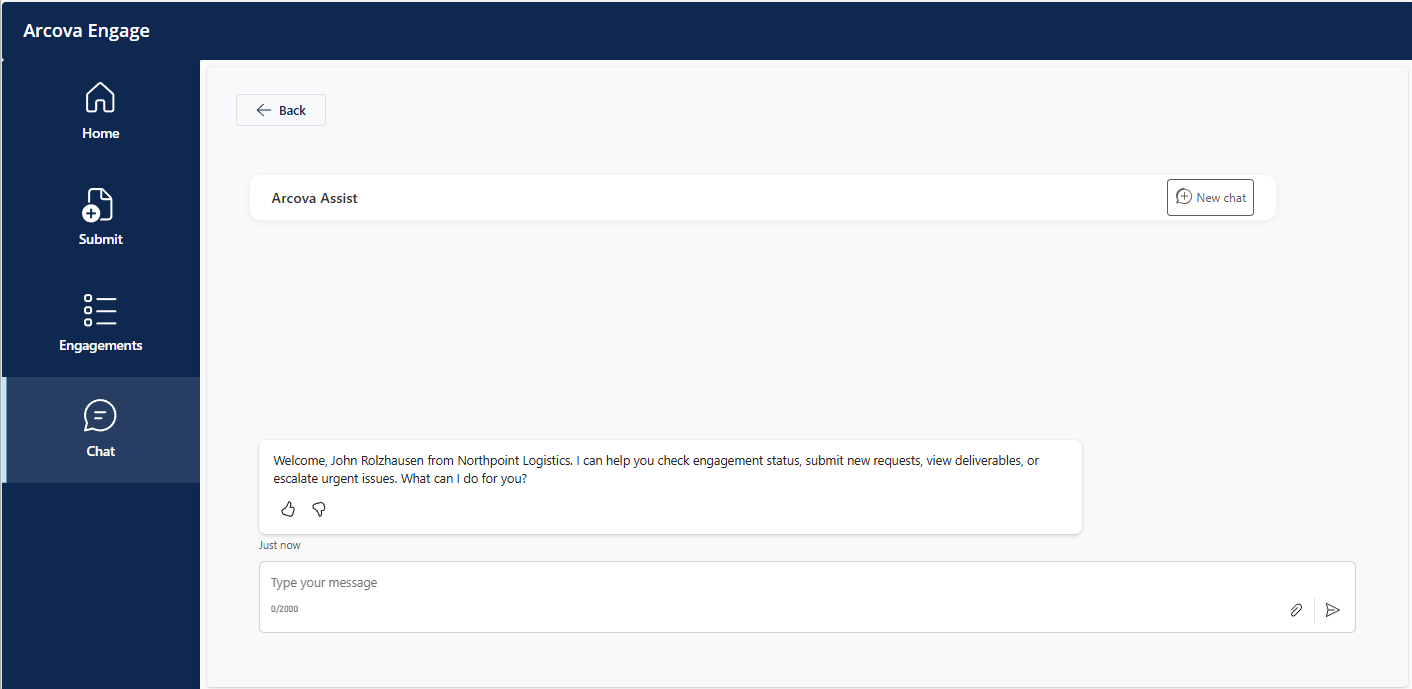
✓ Arcova Assist (Copilot Studio Agent): A conversational AI agent embedded directly in the Client Portal, answering questions and taking actions against live data
✓ Dataverse Data Model: A single relational model unifying Accounts, Contacts, Engagements, Deliverables, Communications, and configuration tables
The Embedded AI Agent
The headline of the project: the Arcova Assist Copilot Studio agent is embedded directly inside the Client Portal, not as a separate tool, but as part of the app itself, with Microsoft Entra single sign-on so the user's identity flows through automatically.
Capabilities:
✓ Resolves the signed-in user's identity automatically, no second login
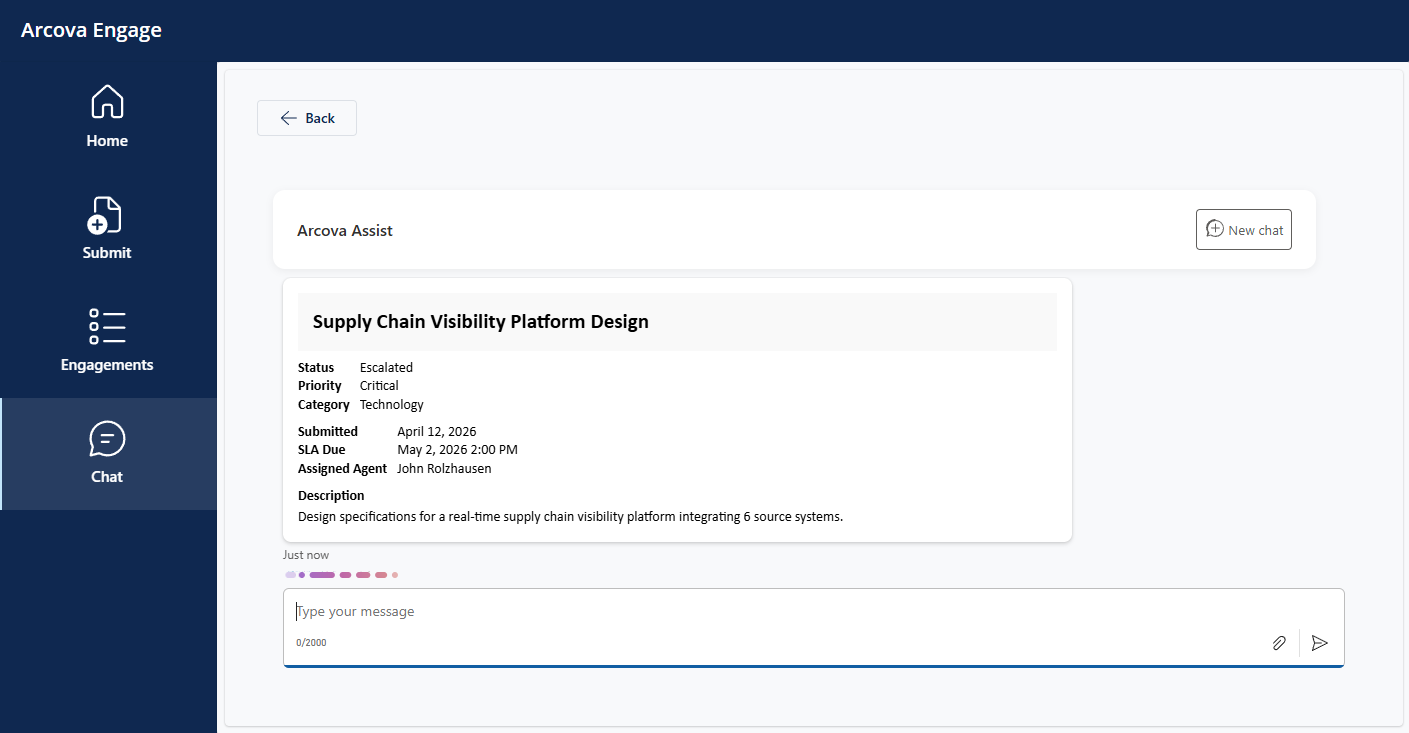
✓ Answers engagement status questions in plain language
✓ Lists a client's deliverables and due dates
✓ Walks a client through submitting a new engagement conversationally
✓ Escalates urgent issues to the right people
✓ Answers process and SLA questions from a curated knowledge source
✓ Returns structured results as Adaptive Cards
✓ Respects account-scoped security, so each client sees only their own data
Technical Implementation:
✓ Embedded via a Power Apps Component Framework (PCF) control built on the Microsoft 365 Agents SDK
✓ Authentication through a Microsoft Entra app registration with single sign-on
✓ Reaches Dataverse through helper flows for multi-step operations
✓ Built using current platform patterns after the previous built-in control was deprecated
Two Apps, Two Audiences
Arcova Engage deliberately uses two different kinds of Power App, each chosen for the audience it serves. The same Dataverse data sits beneath both, but staff and clients get experiences built for how they actually work.
Agent Hub, a model-driven app for staff:
✓ Built on the model-driven framework for data-dense, process-driven work
✓ Custom security roles, forms, and views tuned for engagement management
✓ A guided business process flow walking each engagement from intake to closure
✓ Dashboards surfacing workload and SLA pressure at a glance
Client Portal, a canvas app for clients:
✓ Built on the canvas framework for a tailored, branded self-service experience
✓ A reusable design-token system for consistent styling across screens
✓ Delegation-safe Dataverse queries that scale beyond the local-data limit
✓ Account-scoped so each client sees only their own organization's records
Automation Backbone
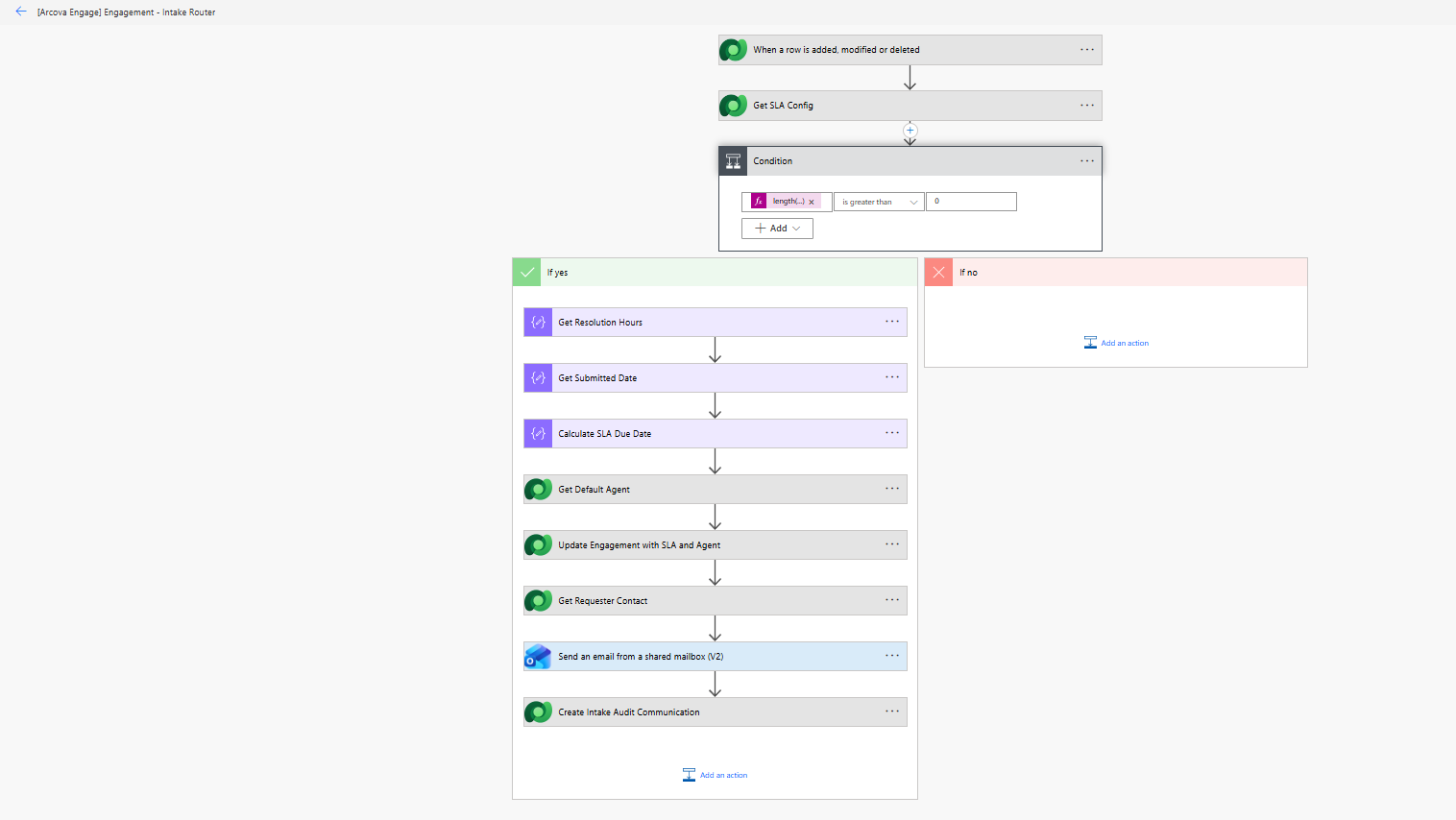
Seven Power Automate flows handle the work that would otherwise fall to manual effort: routing incoming requests, enforcing SLAs, sending notifications, managing approvals, and handling escalations. Together they turn a set of data tables into a system that runs itself.
✓ Intake routing that looks up the right agent by category and assigns the engagement
✓ Automatic SLA due-date calculation from a configurable SLA table
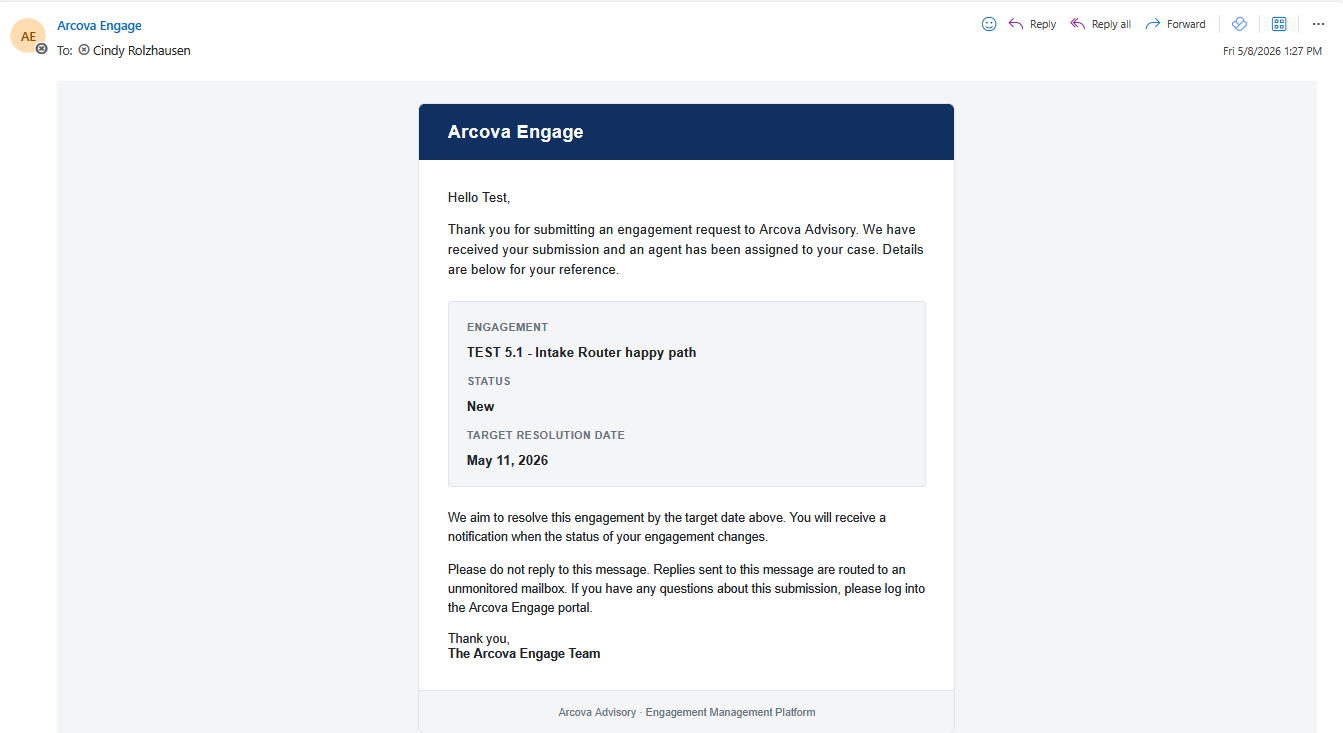
✓ Status-change notifications that keep requesters informed without manual email
✓ A closure approval workflow routed through Microsoft Teams
✓ Scheduled SLA-breach alerts so deadlines never slip unnoticed
✓ An externally callable escalation endpoint the AI agent can trigger
✓ Auto-timestamping and audit-record creation for a clean activity trail
Cross-Phase Composition
The defining characteristic of Arcova Engage is that a single user action sets off a coordinated chain of automation across the whole system.
When a client submits an engagement through the embedded agent, that one conversation cascades automatically:
✓ The agent creates the engagement record in Dataverse
✓ Automation timestamps the submission
✓ The intake router looks up the SLA configuration and the right agent for the category
✓ It calculates the SLA due date and assigns the engagement
✓ A branded confirmation email goes to the client
✓ An audit record is written
✓ The business process flow activates to begin tracking the lifecycle
The result: a request typed into a chat box appears moments later in the staff workspace, fully routed, assigned, and tracked, with no manual handling. This was verified end to end through integration testing across all four surfaces.
View the Complete Project
The full project, including the architecture diagram, personas and user stories, the Dataverse data model, and detailed phase-by-phase write-ups, is available on GitHub.
Repository Includes:
✓ Project brief and phased build documentation (six phases)
✓ Solution architecture diagram rendered natively in the repository
✓ Personas and user stories mapped to the features that fulfill them
✓ Complete Dataverse data model with tables, columns, and relationships
✓ Documented platform constraints and the reasoning behind each decision
✓ End-to-end integration test results across all four surfaces
✓ Exported Power Platform solution package
✓ Post-certification enhancement roadmap
This documentation showcases complete traceability from business problems through technical implementation.
Let's Discuss This Project
I'm happy to walk through any aspect of this solution architecture in detail. From requirements gathering and data modeling through application development and analytics, I can discuss the decisions, tradeoffs, and lessons learned throughout this project.
Global Training Enrollment System
End-to-End Power Platform Solution Architecture
4-Week Development Timeline | 9 SharePoint Lists | 3 Power Apps | 17 Power BI Visuals | Multiple Automated Workflows
The Business Problem
After maintaining an enrollment tracking dashboard for 8 years, organizational expansion required including training centers not in our centralized database. The attempted solution—email-based Excel submissions processed through Power BI—proved fragile and time-consuming.
Key Pain Points:
✓ Manual data consolidation requiring 15-20 hours monthly
✓ Format inconsistencies breaking automated processes
✓ Password-protected files requiring manual intervention
✓ Multi-week reporting delays
✓ No real-time visibility into submission status
✓ Limited ability to identify anomalies or forecast trends
✓ Process broke whenever centers modified Excel formats
This portfolio project represents what I wish we'd built: a properly architected Power Platform solution that handles data inconsistency gracefully, eliminates manual processing, and provides real-time visibility to stakeholders.
The Solution
An integrated Power Platform solution transforming enrollment data collection from a fragmented, manual process into a standardized, automated workflow.
Architecture Components:
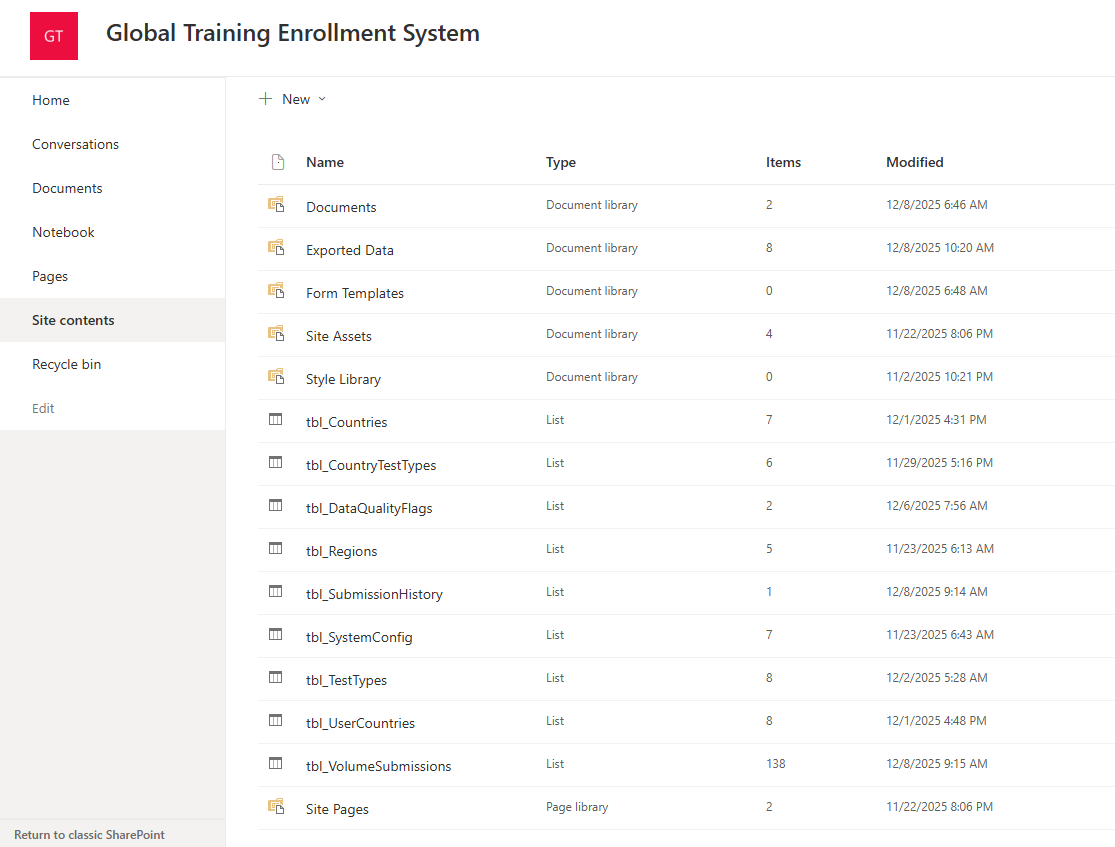
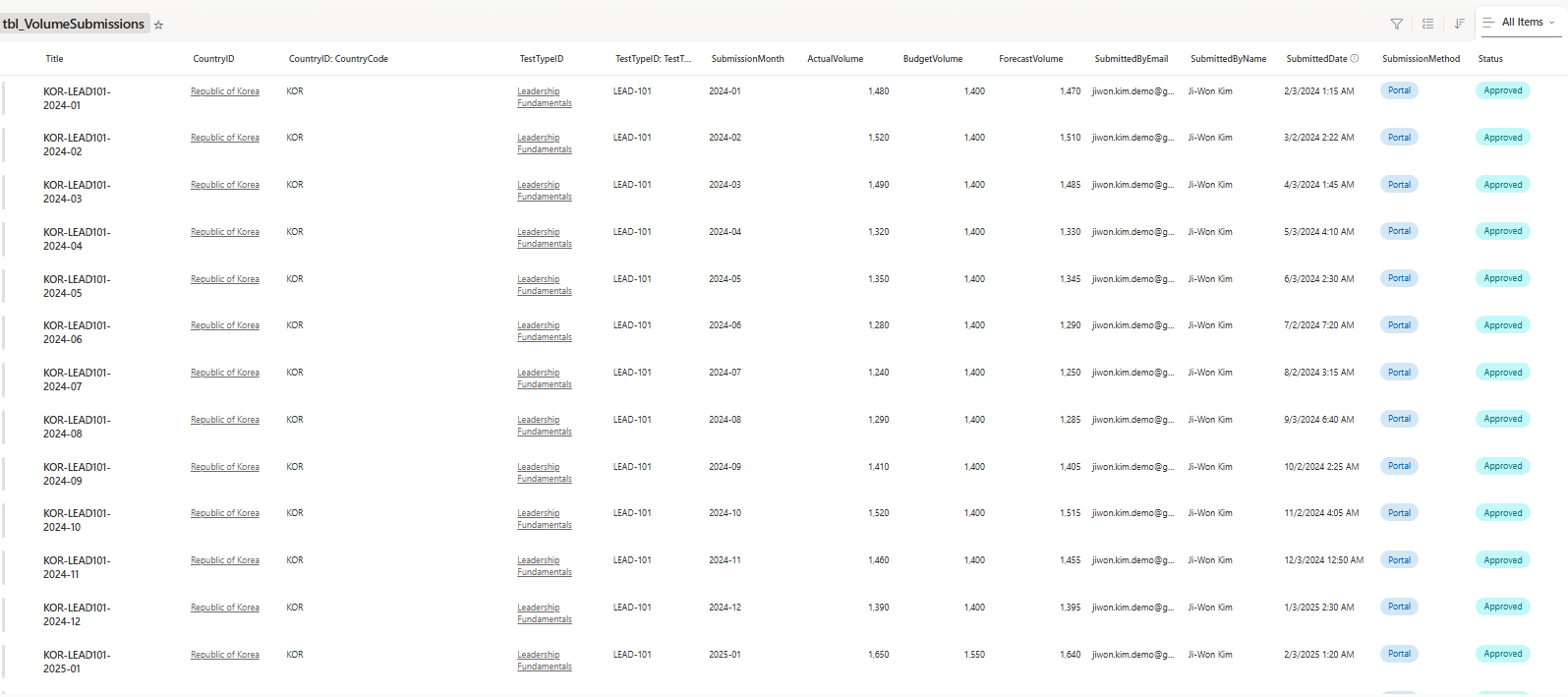
✓ SharePoint Data Layer: 9 normalized lists with referential integrity, audit trails, and validation rules
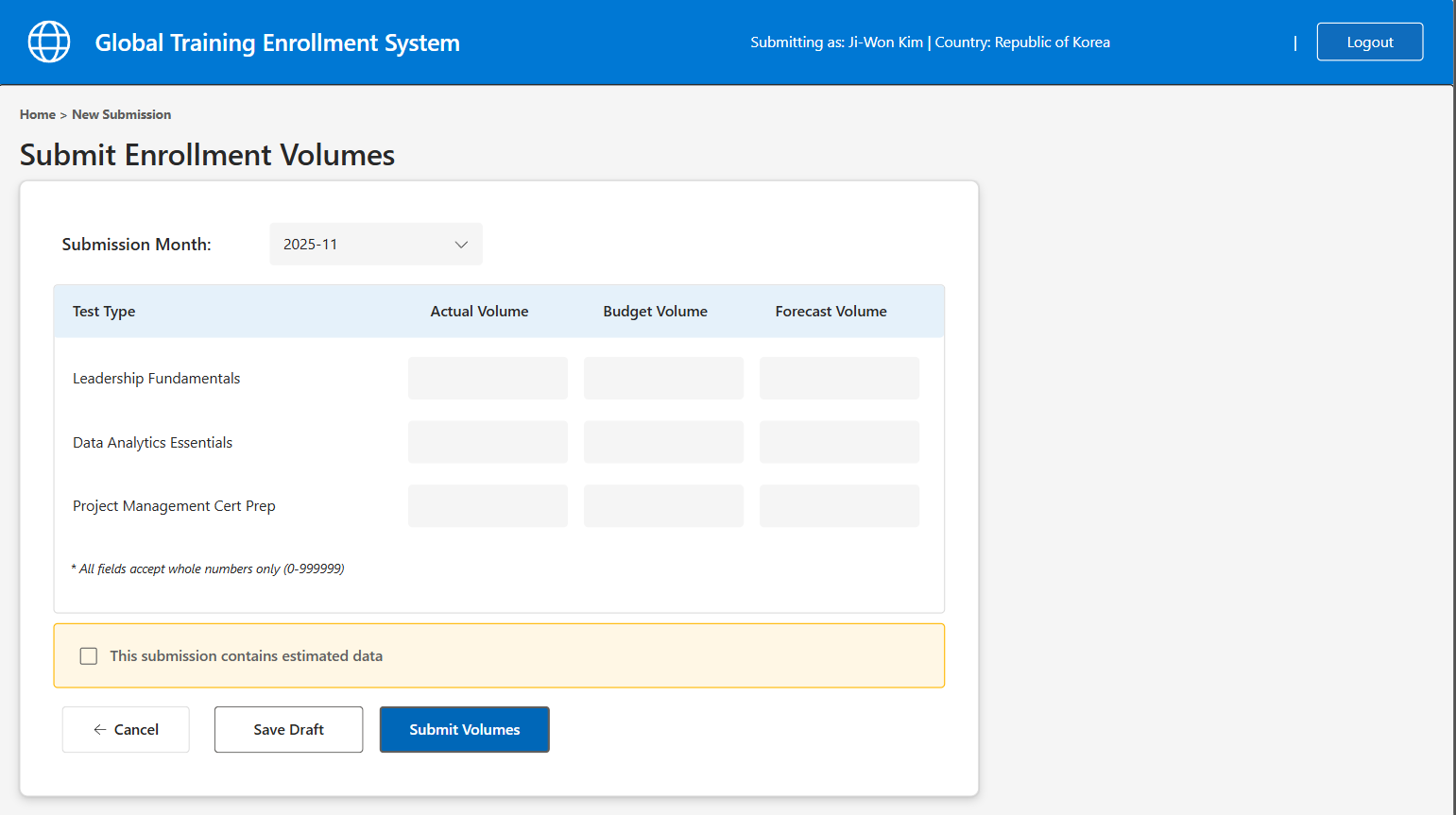
✓ Power Apps Submission Portal: 3-screen application with dynamic forms and real-time validation
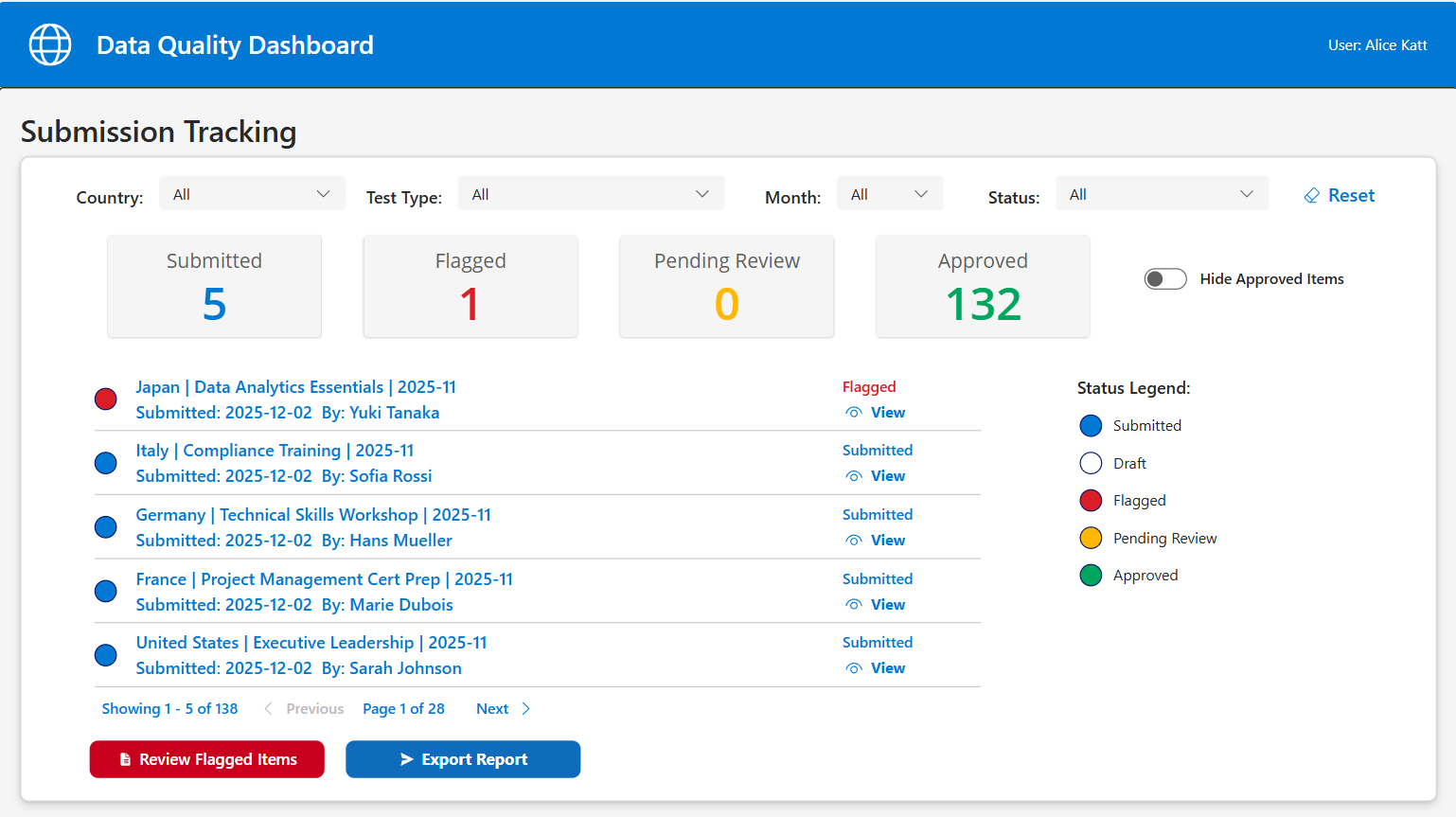
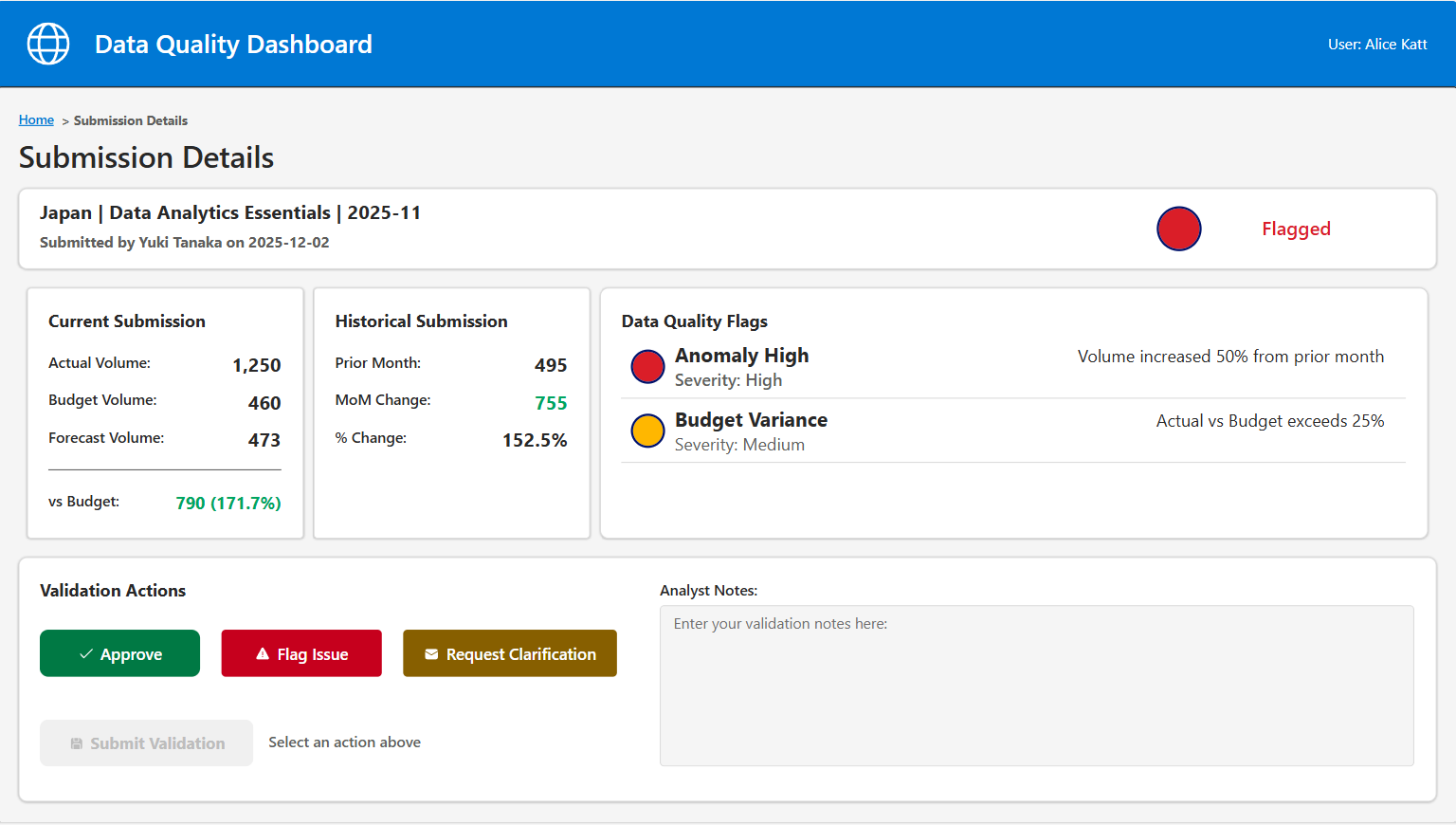
✓ Power Apps Data Quality Dashboard: 2-screen workflow for validation and anomaly detection
✓ Power BI Executive Dashboard: 4 pages with 17 visualizations including Azure Maps integration
✓ Power Automate Workflows: Automated notifications, CSV exports, and data processing
SharePoint Data Model
Designed a normalized database schema with 9 SharePoint lists supporting referential integrity, temporal data tracking, and comprehensive audit trails.
Key Design Decisions:
✓ Normalized to 3rd Normal Form (3NF) to eliminate data redundancy
✓ Surrogate keys (IDs) for all entities with indexed foreign key relationships
✓ Soft delete pattern (IsDeleted flag) to maintain complete audit history
✓ Temporal data tracking with EffectiveDate/EndDate for point-in-time accuracy
✓ Comprehensive validation rules at both SharePoint and application layers
✓ Strategic denormalization for TM1 export performance (TM1CountryName mapping fields)
✓ Text field workaround for Person columns to accommodate single-user tenant constraints
Technical Implementation:
- 9 SharePoint lists with 100+ total columns
- 35+ validation rules enforcing data integrity
- 15+ indexed columns optimized for query performance
- Complete audit trail via Submission_History list tracking all changes
- Sample data seeded for testing and demonstration
Power Apps Applications
Developed three canvas applications demonstrating modern UI/UX design, delegation-aware formulas, and proper separation of concerns.
Submission Portal (3 Screens):
✓ Welcome screen with user role detection and dynamic routing
✓ Volume Entry form with conditional logic, real-time validation, and auto-save
✓ Confirmation screen with submission receipt and historical view
✓ Collection-based theme system for consistent branding across all screens
✓ Sophisticated ForAll/Patch patterns for efficient SharePoint integration
Data Quality Dashboard (2 Screens):
✓ Submission Tracking overview with real-time status monitoring across all countries
✓ Validation Workflow screen with inline editing, reason codes, and communication tools
✓ Filter and search capabilities for large datasets
✓ Role-based access control demonstrating security best practices
Technical Highlights:
- Modern controls throughout for consistent user experience
- Delegation-friendly formulas supporting scale beyond 2,000 records
- Component-based architecture with reusable UI elements
- Error handling patterns with user-friendly feedback
- Responsive design working across desktop, tablet, and mobile
Power BI Executive Dashboard
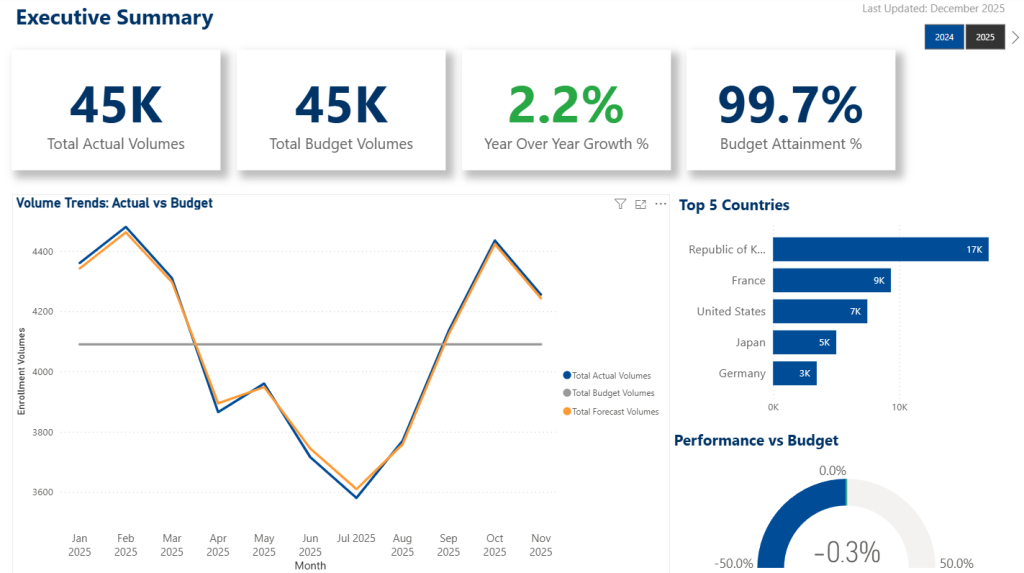
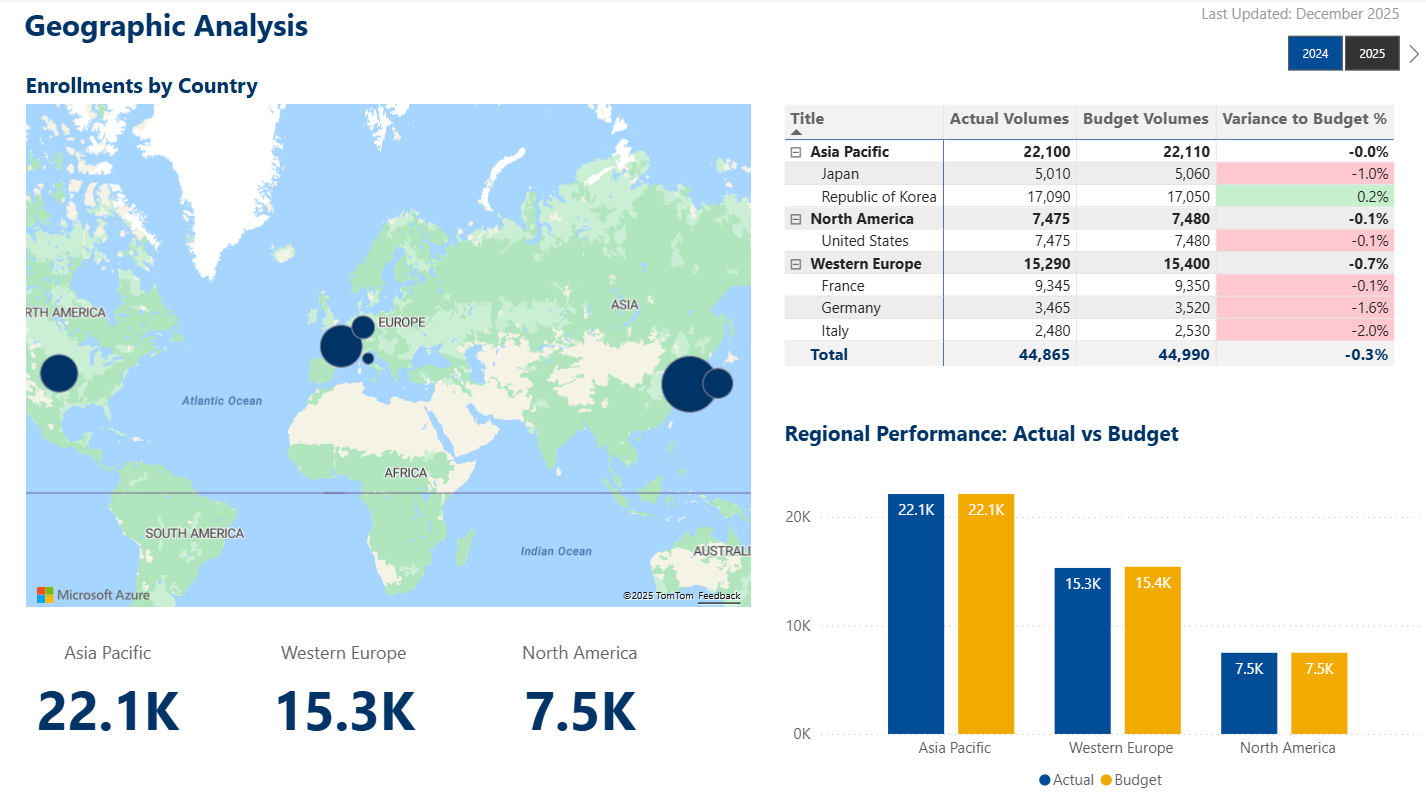
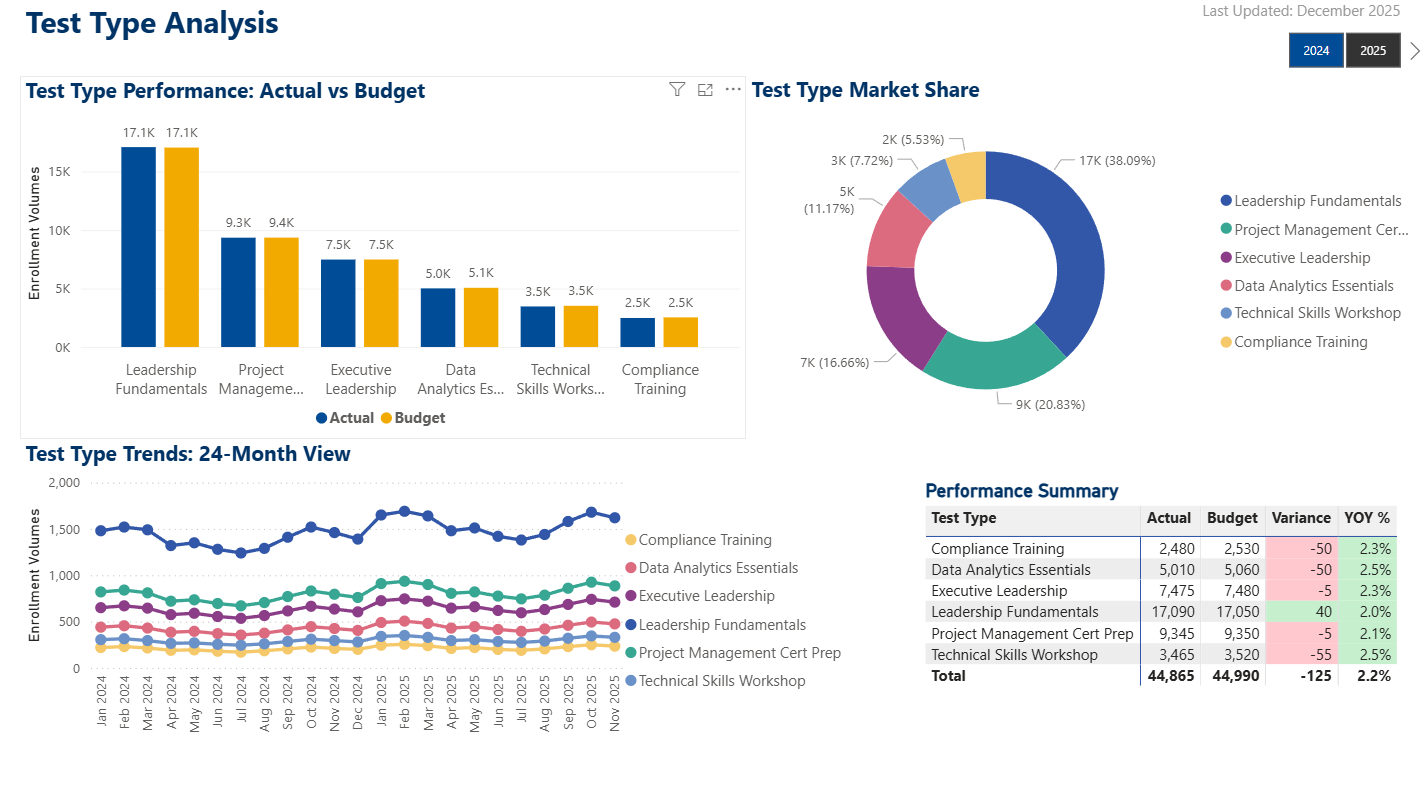
Created a comprehensive analytics solution with 4 report pages and 17 visualizations, including advanced features like Azure Maps integration and sophisticated DAX measures.
Dashboard Pages:
✓ Executive Summary: Key metrics, trend indicators, and high-level KPIs
✓ Geographic Analysis: Azure Maps visualization with country-level drill-through
✓ Trend Analysis: Time-based comparisons with forecasting
✓ Data Quality Scorecard: Submission status tracking and data completeness metrics
Advanced Features:
✓ Azure Maps custom visual replacing deprecated Bing Maps
✓ Hierarchical matrix with expand/collapse functionality
✓ Complex DAX measures for YoY growth, variance calculations, and trend analysis
✓ Conditional formatting highlighting anomalies and targets
✓ Bookmarks and drill-through for interactive exploration
✓ Mobile-optimized layouts for executive access on any device
Technical Implementation:
- DirectQuery connection to SharePoint for real-time data
- Star schema data model with optimized relationships
- 25+ DAX measures supporting complex business calculations
- Row-level security for role-based data access
- Performance-optimized queries leveraging SharePoint indexes
Power Automate Workflows
Designed automated workflows handling notifications, data processing, and system integration.
Implemented Flows:
✓ Submission notifications with dynamic recipient logic
✓ CSV export to TM1 system with data transformation and validation
✓ Automated email delivery using shared mailbox pattern (production best practice)
✓ Error handling with comprehensive logging and retry logic
Integration Patterns:
- Demonstrated cross-tenant email capability (tenant account to external Gmail)
- Professional shared mailbox strategy documented for production deployment
- Efficient data transformation for external system integration
- Systematic approach to workflow design and documentation
Key Achievements & Metrics
This portfolio project demonstrates end-to-end solution delivery capabilities, from requirements gathering through implementation and documentation.
Project Metrics:
✓ 4-week structured development timeline with weekly deliverables
✓ 9 SharePoint lists with 100+ columns and comprehensive validation
✓ 3 Power Apps with 12 total screens and modern UI/UX
✓ 17 Power BI visualizations across 4 dashboard pages
✓ Complete GitHub documentation with 15+ markdown files
✓ 35 sample data records demonstrating realistic scenarios
Demonstrated Capabilities:
✓ Requirements analysis translating business problems into technical solutions
✓ Normalized data modeling with referential integrity and audit trails
✓ Application development with delegation-aware formulas
✓ Advanced analytics with Azure Maps integration and complex DAX measures
✓ Professional documentation following enterprise standards
✓ Systematic troubleshooting and problem-solving (Azure Maps migration, theme system workarounds)
Design Decisions Documented:
✓ Mature judgment removing unnecessary features (Countries to Watch table)
✓ User-focused simplification (bar charts vs cluttered combo charts)
✓ Architectural tradeoffs explained with rationale
✓ Scalability considerations and future enhancement planning
View the Complete Project
The complete project documentation, requirements, data model design, and architecture decisions are available on GitHub. This repository demonstrates professional documentation standards and transparent development practices.
Repository Includes:
✓ Comprehensive requirements document with business rules
✓ Detailed data model with entity relationships
✓ User stories with acceptance criteria
✓ SharePoint schema specifications ready for implementation
✓ Pain points analysis and lessons learned
✓ Design decisions documented with rationale
✓ Future enhancement roadmap
This documentation showcases complete traceability from business problems through technical implementation.